
)





Price: $199.99 - EUR85.74
(as of Apr 08, 2026 10:51:09 UTC – Details)

Product description


 ARMORR
ARMORR products are designed to empower console and portable gaming enthusiasts with robust hardware that maximizes the thrill or gaming, and minimize the fuss.
ARMORR GAMERSBOX 21.5″ for PS5 XBOX Gaming Monitor & Console Case ORION Portable 11.6″ Gaming Monitor for Switch
Orion
Gaming Display
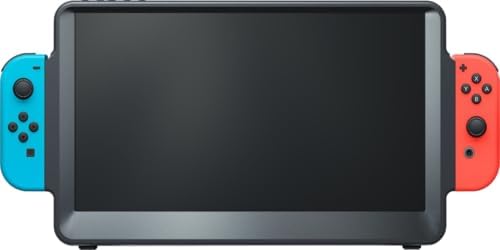
Designed for portable gaming enthusiasts, the ARMORR ORION features a travel-friendly 11.6-inch display optimized for compatibility with Switch and Switch OLED consoles (NOT included), as well as HMDI gaming devices.
Note: This accessory is not an official Nintendo Switch or XBOX product, not manufactured, licensed, or endorsed by Nintendo or Xbox
11.6″ HD IPS Monitor Switch-optimized dock Built-in Speakers Ergo Comfort Grips HDMI Gaming Joy-Con Mounts Power source: Original Nintendo Switch AC adapter or USB-C compatible power bank (not included) Battery: No built-in battery

11.6″ HD IPS Monitor
The ORION features a 11.6-inch IPS display* with wide-angle viewing range, anti-glare finish, dynamic contrast, and Overdrive supported response time.
*Note: “No Signal” may display if there is inadequate power, improper Switch insertion, Switch sleep mode (press Joy-Con HOME), or cable incompatibility with Switch.

Switch-Compatible Docking
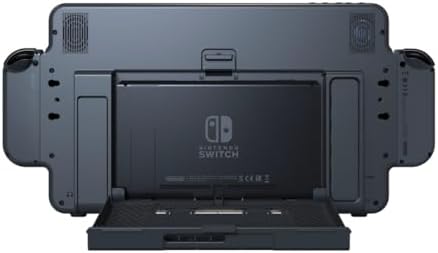
The built-in ventilated dock is optimized for compatibility with Switch & Switch OLED platforms*.
*Note: Does NOT include Switch consoles or Joy-Con controllers).

Built-in Speakers
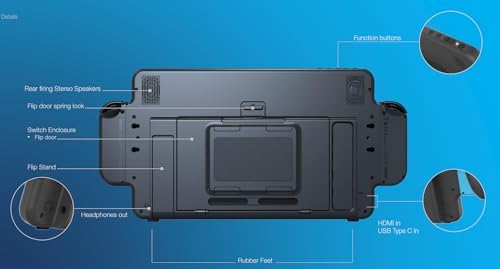
The rear panel includes two 2.5W stereo speakers (with manual volume control) for improved audio, and a 3.5mm audio-out pass through for headphones.

Ergo Comfort Grips
Detachable Ergo Comfort grips can be fitted to the outside of the Joy-Con slots for a more console-style feel and extra support.
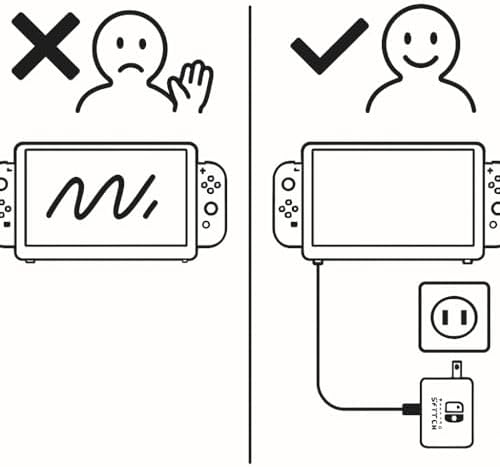
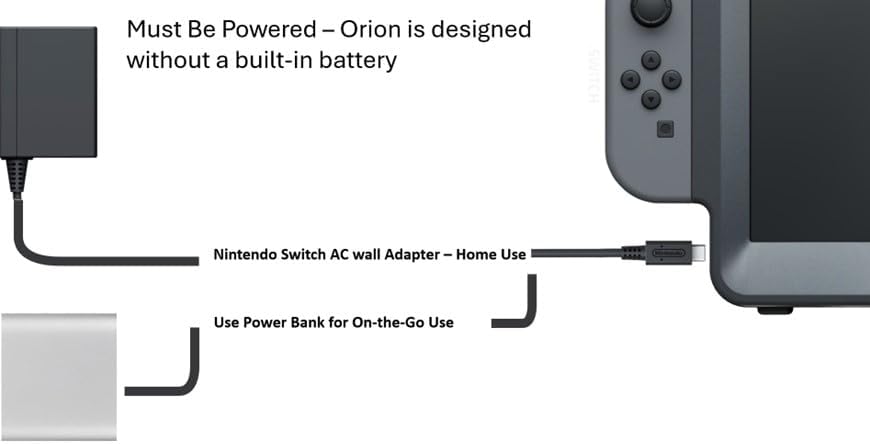
Orion has no built-in battery — must use Nintendo Switch original charger

Orion has no built-in battery — must use Nintendo Switch original charger
ORION does not include a built-in battery and requires an external power source to operate.
When using ORION with a Nintendo Switch, please connect the device using the original Nintendo Switch AC adapter.
Without sufficient power, the display will not function or may show no signal.
Power adapter, cable, and power bank are not included.

HDMI Gaming
Laptops, Xbox, PS5, and even mobile phones and connect to the monitor via the HDMI-in port for use a second display or larger screen (mobile).

Joy-Con Mounts
The sides of the display are designed to fit Joy-Con controllers

Kickstand
A concealed kickstand at the back is available for tabletop display should player’s hands become tired.

Designed without a built-in battery
Stays powered through your Nintendo Switch AC adapter or any compatible power bank (not included), so you can enjoy uninterrupted gaming anywhere.
*Note: Does NOT include AC Power Adapter or battery pack.
Specifications & Accessories
Display 11.6″ IPS Screen Finish Anti-Glare Surface Overdrive Response Time Yes Display Input USB Type-C (iPhone 15 and most Android devices) & HDMI-in Dynamic Contrast Yes External Device Compatibility Laptop, Xbox, PS, mobile phones Kickstand Yes Touch Screen No Speakers 2 x 2.5W Stereo Headphone Option 3.5mm jack Manual Volume Control Top Side Slots Joy-Con compatible (NOT included) Functions Gaming, Movies, 2nd Display Internal Bay Compatibility Switch & Switch OLED (NOT included) Power Source Nintendo Switch AC wall Adapter – Home Use or Power Bank for On-the-Go Use ( no built in battery) Accessories Detachable Ergo Comfort grips
Q: What should I do if ORION displays “No Signal” or does not power on?
A: Please check the following:
Ensure ORION is connected to power using the original Nintendo Switch AC adapter or a compatible power bankConfirm that the Nintendo Switch has sufficient battery power and is turned onMake sure the Nintendo Switch is properly inserted into the rear dock with the screen facing forwardIf the Switch has entered sleep mode, press the HOME button on the Joy-Con to wake it upStartup may take six to eight seconds due to the Switch USB-C charging protocolSome non-Switch power adapters may be incompatible; using the original Switch adapter is recommended
A: ORION is compatible with Nintendo Switch and Nintendo Switch OLED.
Q: Does ORION include a Nintendo Switch console?
A: No. The Nintendo Switch console is not included.
Q: Will using ORION cause my Nintendo Switch to overheat?
A: ORION is designed with rear ventilation openings to support airflow during use.
Q: Is ORION compatible with other devices?
A: ORION functions as a display monitor and supports devices with HDMI output, such as game consoles and laptops. It can also connect to USB-C smartphones that support video output.
Devices with charging-only USB-C ports are not supportedA USB-C male-to-female cable is required for smartphone connections
Q: Does ORION have a built-in battery?
A: No. ORION does not have a built-in battery. It must be powered using the Nintendo Switch AC adapter or a compatible power bank.
Q: Is a power adapter included?
A: No. A power adapter is not included. Please use the original Nintendo Switch AC adapter or a compatible power bank.
Q: Is ORION a touchscreen?
A: No. ORION does not support touchscreen input.
[ WHAT’S INCLUDED ] (1) ORION portable monitor for Nintendo Switch (2) Travel pouch. (3) User Manual **[ WHAT’S NOT INCLUDED ] ** Switch, Charger and Joy-Con controllers are NOT INCLUDED; simply use your existing Nintendo Switch power charger/Adapator or a compatible power bank, and your own Switch Joy-Con controllers.
[ SWITCH TO MORE SCREEN ] – The 11.6″ HD IPS monitor features dynamic contrast, Overdrive response time, and triple the screen area of 6.2″ Switch LCD & 7″ Switch OLED consoles; Compatible with Joy-Con controllers (console & controllers NOT included)
[POWER REQUIREMENT ] – Orion must be powered by the Nintendo Switch AC charger/adaptor or a power bank (not included)—if the Switch is docked in Orion without power connected, the screen will show “No Signal.” If you experience this issue, please scroll down to the FAQ below.
[ DOCKING BAY & JOY-CON GRIPS ] – The internal console dock is Nintendo Switch & Switch OLED compatible with base-to-top airflow vents; Detachable Ergo Handles can be fitted on each side for improved controller comfort and stability
[ HDMI GAMING DISPLAY ] – PS5, Xbox, laptop and smartphone devices can be connected to the screen via HDMI-in port; iPhone gamers with iOS 16 or higher can pair Joy-Con controllers for Switch-style mobile gaming on a bigger screen
[ SUPERIOR STEREO SPEAKERS ] – The rear panel is outfitted with two 2.5-watt speakers for enhanced gaming immersion; A 3.5mm audio-out pass-through jack is also available next to the kickstand support at the back
[ EFFORTLESS SCREEN REPLACEMENT ] – If your Switch still works but the screen is broken or unresponsive, simply dock the Switch into Orion to instantly use it as your new display—no repairs, tools, or disassembly needed.
This accessory is not an official Nintendo Switch or XBOX product, not manufactured, licensed, or endorsed by Nintendo or Xbox